LMS
LMS
Last updated on 28th Apr 2026| 11487

- Introduction to Workday Finance Tutorial
- Basics of Accounting Concepts
- Workday Financial Structure (Worktags & Organizations)
- Journal Entries in Workday
- Accounts Payable (AP) Process
- Accounts Receivable (AR) Process
- Financial Reporting in Workday
- Month-End Closing Process
- conclusion
Introduction to Workday Finance Tutorial
Workday Finance, formally known as Workday Financial Management, is a cloud-based enterprise resource planning (ERP) system designed to manage an organization’s financial processes in real time. Unlike traditional ERP systems, Workday operates entirely in the cloud, which means users can access it from anywhere without needing heavy infrastructure. With the support of Workday Finance Training, professionals can gain hands-on expertise in configuring and managing financial processes effectively. One of the main advantages of Workday Finance is its real-time data processing. Transactions are updated instantly, allowing finance teams to make faster and more informed decisions. The system is highly flexible and scalable, making it suitable for both small businesses and large multinational organizations. The user interface of Workday is modern and intuitive. Accounts Receivable uses a search-driven navigation system where users can quickly find tasks, reports, or transactions. Dashboards provide insights into financial performance, and role-based access ensures that users only see relevant data. Workday Finance Tutorial integrates seamlessly with other modules like Human Capital Management (HCM), Procurement, and Payroll. This integration helps maintain consistency and accuracy across all business processes.
Basics of Accounting Concepts
- Financial Accounting: Focuses on recording and summarizing financial transactions. Helps businesses track income and expenses, provides useful information for decision-making, and ensures accuracy and transparency in financial records.
- Assets: Resources owned by a business such as cash, inventory, and equipment. Have economic value and help generate income. Can be current (short-term) or non-current (long-term), including examples like buildings, machinery, and investments.
- Liabilities: Obligations or debts of a business such as loans and payables. In Workday Payroll processes, these represent amounts the business owes to others and can be short-term or long-term, including bank loans, creditors, and outstanding expenses.
- Equity: The owner’s share in the business, including capital and retained earnings. Represents the net value of the company, increases with profits, decreases with losses, and includes owner investments and accumulated earnings.
- Accounting Equation: Assets = Liabilities + Equity. This fundamental equation shows the relationship between assets, liabilities, and equity, ensuring that every transaction keeps the accounts balanced.
- Double Entry System: Every transaction has two effects—a debit and a credit. Ensures accuracy in accounting records, helps detect errors, and maintains balance by affecting at least two accounts.
Looking to earn your Workday certification? Take a look at the Workday Finacials Training offered by ACTE today!
Workday Financial Structure (Worktags & Organizations)
In Workday Finance, the financial structure is designed to organize and track transactions efficiently using Worktags and Organizations. Worktags are flexible labels that categorize financial data across multiple dimensions, such as Cost Centers, Departments, Projects, Locations, or Funds. Instead of relying solely on a rigid Chart of Accounts, Worktags allow businesses to assign multiple attributes to a single transaction, enabling detailed reporting and analysis. Organizations define the company’s structural hierarchy, including Companies (legal entities), Cost Centers (departments responsible for expenses), Business Units (operational divisions), and Supervisory Organizations (reporting structures). By combining Worktags with organizational units, Workday Finance Training ensures accurate tracking, accountability, and real-time insights into financial performance.
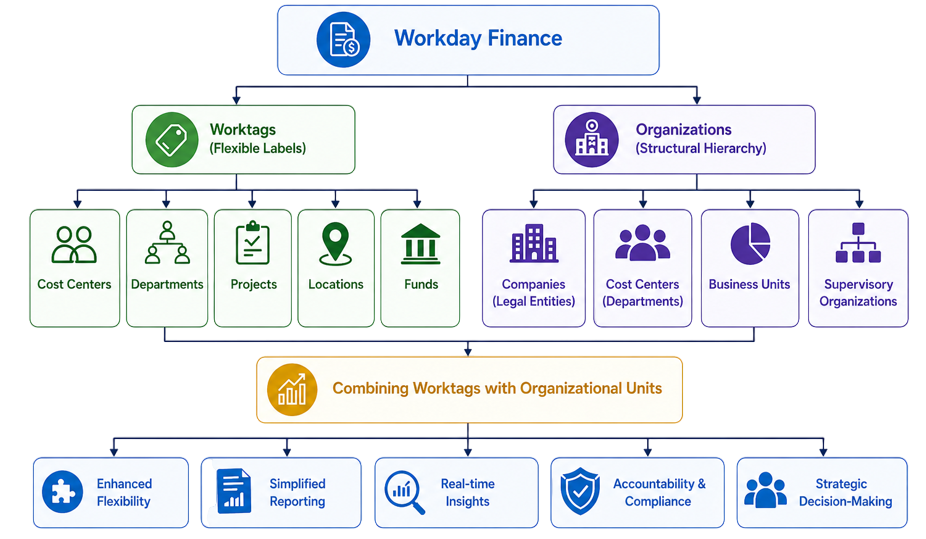
Accounts Receivable structure enhances flexibility, simplifies reporting, and supports strategic decision-making for both small and large enterprises.Additionally, Workday’s financial structure allows managers to monitor budgets and expenses at multiple levels. Human Capital Management supports auditing and compliance by maintaining a clear record of all transactions. Employees can quickly assign Worktags during transactions, reducing errors and improving accuracy. Overall, this design makes financial management more transparent, efficient, and adaptable to changing business needs.
Get your Workday certification, gain knowledge from top AWS experts and enhance your career with ACTE’s Workday Finacials Training .
Journal Entries in Workday
Journal entries in Workday are used to record financial transactions in the general ledger, forming the foundation of accurate accounting. Each journal entry represents at least one debit and one credit, following the double-entry accounting principle. In Workday HCM environments, this principle supports accurate financial tracking and integration with workforce-related transactions. In Workday, users can create manual journal entries for adjustments or corrections, and system-generated journals that are automatically posted from integrated modules like Accounts Payable, Accounts Receivable, or Payroll. Each entry includes details such as the date, accounts involved, debit and credit amounts, Worktags (like Cost Center or Project), and a brief description of the transaction. Workday provides an approval workflow for journal entries, ensuring that entries are verified by authorized personnel before posting to the ledger. Users can also edit or reverse journal entries if errors are detected, maintaining a full audit trail. Additionally, Workday supports recurring journals, which are useful for repetitive transactions like depreciation or accruals. By combining flexibility with automation, Workday ensures that journal entries are accurate, auditable, and easily integrated with reporting and financial analysis. This makes financial management more efficient and transparent while reducing the risk of errors.

Learn Workday Finacials Training Course to Build Your Skills
Weekday / Weekend BatchesSee Batch DetailsAccounts Payable (AP) Process in Workday
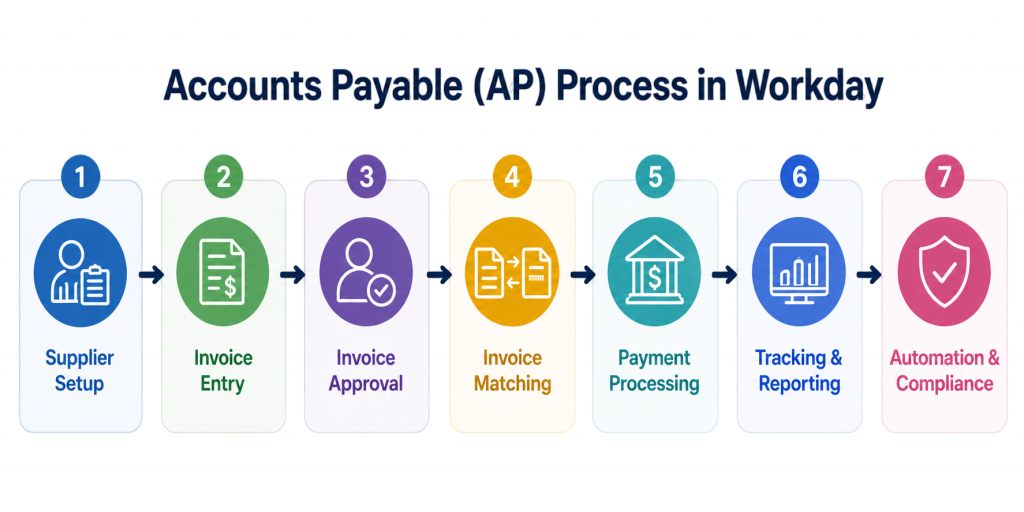
- Supplier Setup: Enter supplier details in Workday, including bank information and tax IDs. Ensure suppliers are approved before processing invoices, categorize them by type, location, or payment terms, and enable accurate and timely payments.
- Invoice Entry: Enter invoices manually or through automated OCR capture, including details like invoice number, date, amount, and Worktags. Assign appropriate accounts for accurate ledger posting and allow efficient processing of multiple invoices.
- Invoice Approval: Routes invoices through an approval workflow in Workday, validating them against purchase orders or contracts. Ensures only authorized expenses are paid while reducing errors and preventing duplicate payments.
- Invoice Matching: Matches invoices with purchase orders and receipts to detect discrepancies before payment. Supports 2-way or 3-way matching and maintains financial accuracy and compliance.
- Payment Processing: Schedules payments through bank transfers, checks, or electronic methods. Automatically updates the general ledger, supports early payment discounts, and ensures timely and accurate settlement of obligations.
- Tracking & Reporting: Monitors outstanding invoices, due dates, and payment status using dashboards and reports. Helps identify bottlenecks or delayed approvals and supports effective cash flow management.
- Automation & Compliance: Automates repetitive tasks to reduce manual errors and maintains audit trails for all transactions. Ensures compliance with internal controls and policies while enhancing transparency in financial operations.

Get Job Oriented Workday Finacials Training for Beginners By MNC Experts
- Instructor-led Sessions
- Real-life Case Studies
- Assignments
Accounts Receivable (AR) Process
The Accounts Receivable (AR) process in PSRS begins with creating customer invoices for goods or services provided, ensuring accurate billing details, pricing, and tax calculations. Once invoices are generated, receivables are recorded in the system to track outstanding amounts and monitor who owes money. The process then moves to payment collection, where customer payments are received through various methods such as cash, bank transfers, or online modes, and are properly updated in the system using Workday Management. These payments are applied to the corresponding invoices through cash application, ensuring accurate matching and reducing discrepancies. Additionally, credit management plays an important role by monitoring customer credit limits and payment behavior to minimize financial risks. The system also supports collections and follow-ups by identifying overdue invoices and sending reminders to improve cash flow. Reporting and analysis provide insights through aging reports and receivable summaries, helping organizations track outstanding balances and payment trends. Finally, the AR process integrates with financial modules like the general ledger, ensuring accurate accounting, real-time updates, and reduced manual errors.
Want to Master Gen AI? Explore the Workday Finacials Master Program Offered at ACTE Today!
Financial Reporting in Workday
- Overview of Financial Reporting: Workday provides real-time financial reporting to track the financial performance of an organization. Reports are updated instantly as transactions are recorded, enabling faster and better decision-making.
- Standard Financial Reports: Includes key reports such as Trial Balance, Balance Sheet, and Profit & Loss. These reports show the financial position and performance of the organization and are easily accessible through dashboards for internal and external reporting.
- Custom Reports: Allows users to create reports based on specific business needs. Supports filters using Worktags, enables flexible data analysis, and provides detailed insights for management.
- Dashboards & Analytics: Interactive dashboards offer visual insights into financial data. Users can drill down into detailed information, helping identify trends and patterns while improving financial planning and control.
- Worktags in Reporting: Uses Worktags such as Cost Center or Project to generate reports. Enables multi-dimensional reporting, provides detailed breakdowns of financial data, and improves accuracy and analysis.
- Real-Time Data Access: Eliminates the need for batch processing by reflecting current financial data instantly. Supports quick decision-making and reduces delays in reporting.
- Compliance & Audit Reporting: Supports regulatory and statutory reporting while maintaining audit trails for all transactions. Ensures compliance with accounting standards and simplifies audit processes.
Month-End Closing Process
The Month-End Closing Process in Workday is a critical accounting activity used to finalize all financial transactions for a specific period. It involves reviewing and verifying all journal entries to ensure accuracy and completeness before closing the books. During this Workday Finance Training process, accountants perform account reconciliations, comparing system records with external data such as bank statements to identify and correct discrepancies. Adjusting entries, such as accruals, deferrals, and depreciation, are recorded to reflect the true financial position of the organization. Workday provides tools like close checklists, automated workflows, and task tracking to ensure all steps are completed on time. Once all activities are verified, the accounting period is officially closed to prevent further changes. Human Capital Management process ensures accurate financial reporting, compliance with accounting standards, and provides a reliable basis for decision-making.
Want to Learn About Workday? Explore Our Workday Interview Questions and Answers Featuring the Most Frequently Asked Questions in Job Interviews.
Conclusion
Workday Finance Tutorial provides a modern and efficient way to manage financial operations by combining strong accounting fundamentals with advanced technology. By Join Our Workday Finance Training to understanding key concepts such as accounting basics, Worktags, journal entries, Accounts Payable, Accounts Receivable, financial reporting, and the month-end closing process, freshers can build a solid foundation in finance. Workday’s real-time data, automation, and flexible reporting make financial tasks more accurate, transparent, and faster to perform. Overall, learning Workday Finance not only improves technical skills but also enhances decision-making abilities, making it a valuable tool for a successful career in accounting and finance.